
Skip to content
Mikzu
  • Home
  • Career & Job Advice
    • Hands-On & Creative Work
  • Business & Finance
  • Tech & Digital Careers
    • Virtual
Mikzu
  • Home
  • Career & Job Advice
    • Hands-On & Creative Work
  • Business & Finance
  • Tech & Digital Careers
    • Virtual

Slack’s Best Features For Working From Home When Sick

July 22, 2025September 12, 2022
ADVERTISEMENT

With this pandemic, most people have found themselves in situations where working from home is the last remaining option. Technology has given us resources like Slack that enable people who are working remotely to come together in order to complete tasks. You don’t need to be concerned about how you will be communicating with your boss or colleague when sick; Slack has got you covered.

Explore More Creative Work Options Find Practical Hands-On Careers Discover Skill-Based Job Paths

This fantastic tool has so many features that make it extremely helpful for people working remotely. In this piece, we’ll focus on a few of the features that will make your work as efficient as possible. What’s more, regardless of where you are in the world, this app is your savior.

Related Posts
5 Women CEOs That Have Paved The Way For Our Generation

5 Women CEOs That Have Paved The Way For Our Generation

→
The Difference Between Residential and Commercial Painters

The Difference Between Residential and Commercial Painters

→
The Key to Successful Customer Relationship Management

The Key to Successful Customer Relationship Management

→

Without taking up too much of your time, let’s figure out some of the fantastic features of Slack. With this app, adjusting to working from home will be a breeze. 

slack

You Can Pin Reference Links And Messages To Channels

Gone are the days when people had to save work in Google Docs and then scroll through their files to find what they needed. With Slack, you can pin relevant links and messages which come in handy when you need them ASAP. What’s more, you can pin up to 100 messages, documents, or even files. However, be sure to pin only the essential files as pinning other items defeats the purpose.

Managing Documents

With Slack, you can manage your files and documents with a simple button. You can make use of Dropbox Paper and Drive to easily navigate through your documents and avoid going back and forth. This is especially essential for busy teams as it helps them quickly locate their saved records.

Advanced Search Options

More like Google, the search function helps you search for what you need in one minute. All you need to do is put a term in quotes, and it will dial up matches. With this feature, you don’t have to spend time searching through a busy chat for something you need. 

Shared Channels Connecting People Across Workplaces

From colleagues across the globe to small businesses to freelancers, this tool connects people and keeps them on the same page. What’s more, you can also use Slack to communicate with people working outside your organization, too.

You can use this shared channel to connect with a variety of people, as it provides a direct line of communication between people or organizations. You must, however, pay to access this feature. However, it is worthwhile if you are seeking an ongoing secure communication platform.

Sidebar

The sidebar menu allows you to sort direct messages and channels to people. If there are specific people you are always in touch with regularly, this tool organizes their contacts at the top sidebar where you can’t lose sight of them. You also have the option of customizing your theme and using different colors available. You can either choose bright colors or the more neutral ones. You can experiment with various colors and patterns to make the whole thing fun and interactive.

Setting Reminders

With people working remotely, it’s easy for them to forget important tasks because of distractions. Thanks to Slack, where you can set reminders to help you keep track of your tasks. Make use of the reminder option to remind yourself of important meetings, deadlines, files, messages to send, and so much more. This is one helpful feature that makes Slack the best tool to use.
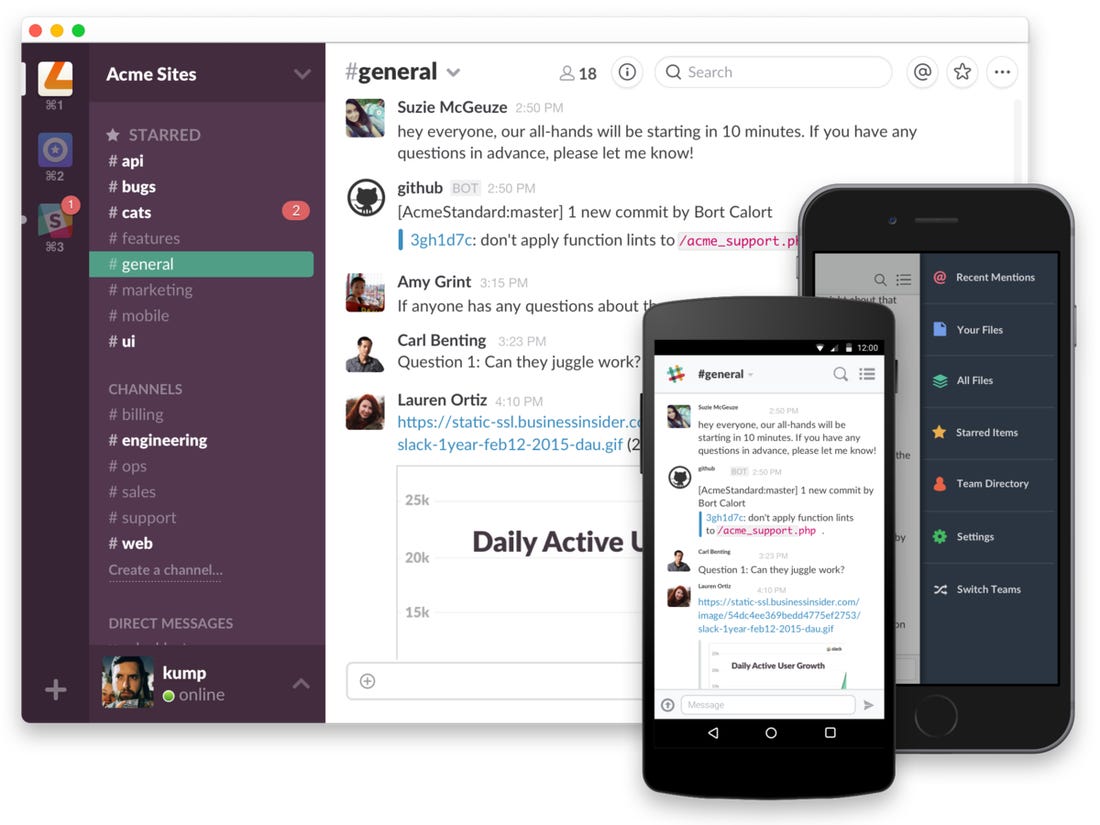
slack
Image source: businessinsider.com

Bottom Line

If you are at home sick and have no way of getting to your workplace, you do not have to worry as Slack is here to help you. It’s an easy-to-use tool with amazing features that make working from home efficient and effective. So what are you waiting for, download the app and make use of their features today.

Also read – Discover the Best Global Companies to Work from Home for and How to Apply

Jordan Hale
Jordan Hale
Jordan Hale is the lead editor at Mikzu.com, covering Animal & Science, Business & Finance, Career & Job Advice, and Tech & Digital Careers, with hands-on guides for Side Gigs and Virtual work. With a background in Science Communication and a graduate degree in Applied Economics, Jordan turns studies, market data, and real practitioner insights into clear, step-by-step takeaways. The work emphasizes transparent methods, plain language, and transferable skills for career starters and switchers alike. Jordan’s goal is to help you choose confidently, cut the noise, and build a sustainable path—whether in labs, offices, or remote setups.

Related Posts

Start A Career Flipping Houses 1

Start A Career Flipping Houses

6 Jobs For Fashion Lovers 2

6 Jobs For Fashion Lovers

Florist Business

How to Startup a Florist Business

Being a Geologist: Essential Info You Need to Know 3

Being a Geologist: Essential Info You Need to Know

How to Become an Automotive Technician 4

How to Become an Automotive Technician

Discover the Best Sites to Learn How to Repair Cell Phones for Free 5

Discover the Best Sites to Learn How to Repair Cell Phones for Free

Online Paralegal Jobs - How to Apply?

Online Paralegal Jobs – How to Apply?

tailoring business

How to Advertise Your New Tailoring Business

How to Make Money Locating Apartments 6

How to Make Money Locating Apartments

How To Start A Customized Jewelry Business 7

How To Start A Customized Jewelry Business

Online Data Entry Jobs - How To Apply? 8

Online Data Entry Jobs – How To Apply?

How to Start a Career Working in a National Park 9

How to Start a Career Working in a National Park

MOST RECENT

  • World Cup Sticker Collections: Discover Popular Albums and Packs for Collectors
  • Best Football Sticker Packs for Collectors: Hot Trends and Must-Have Editions
  • World Cup Album Collectors Are Hunting These Stickers
  • Football Collectibles Trending Worldwide: Albums and Sticker Packs
  • Collectible Football Stickers: Check Popular Player Editions
  • World Cup Sticker Albums Are Trending Again: Check Available Packs
  • Limited Edition Football Stickers: Discover Top Collector Picks and Their Rising Value
  • Completing World Cup Sticker Albums: Insights on Sticker Packs and Collecting Trends
  • World Cup Sticker Deals: Unlock Savings on Packs, Albums, and Collectibles
  • Free Delta Care Samples – Explore Available Offers
  • Free Diabetes Care Food Samples: Check Available Offers
  • Unlock More with Free Google Docs Premium Features: A Practical Guide for Everyday Users
  • Free Walgreens Cat Food Samples: Explore Pet Offers
  • Frequent Flyer Gas Rewards: Check Available Benefits
  • Full Cat Food Samples: Explore Free Pet Offers
  • About
  • Privacy Policy
  • Contact
  • Terms of Service
Mikzu © 2026. All rights reserved.